Download Different Font on my Galaxy Device
Last Update date : Oct 29. 2026
Want to download different fonts to further customise your Galaxy device? Follow the below guide for step-by-step instructions.
Please Note: This guide is designed for Australian variant Galaxy devices, if you have an international device and require further support click here to get in touch with your Samsung subsidiary.
1
Head into your Settings > Display
![Select Display]()
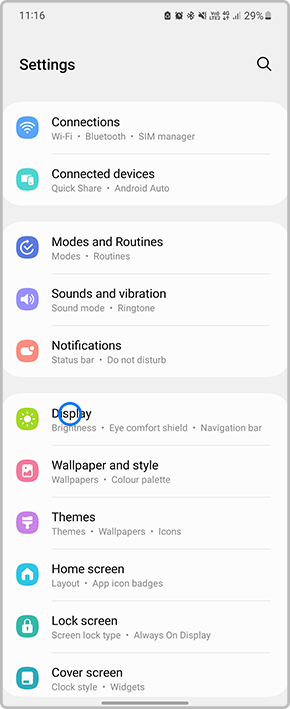
2
Select Font size and style
![Select Font size and style]()

3
Tap on Font style
![Select Font style]()

4
Select Download Fonts
![Select Download Fonts]()

5
Locate a font you would like to install then tap on the Download button
![Locate a font you would like to install then tap on the download button]()

6
Once the new font has been installed, head back to your Font Style settings and tap on the new font to apply changes
![select new font]()

7
Once applied you will then be able to view the new font
![Once applied you will then be able to view the new font]()


Thank you for your feedback!
Please answer all questions.
Contact Info
Contact us
For support buying a product, help with an order or technical product support
WhatsApp
![]()
![]()


It's now even easier to get in contact with Samsung Customer Care, now on WhatsApp.
Troubleshoot and book a repair
Support for your mobile devices, home appliances, TV and computing products